Assignment 3: Creating Interactive Visualization Software
Due: Monday Oct 27, 2025 by 10:30am
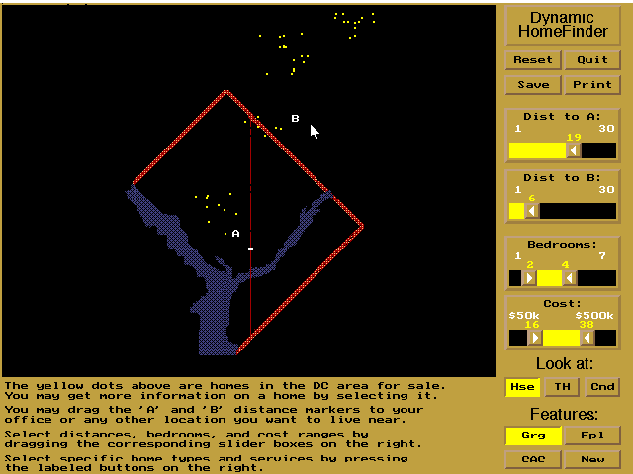
In this assignment, you will explore the issues involved in implementing interactive visualization software. Specifically we would like you to implement the interactive technique of dynamic queries – first explored in the HomeFinder application. However, instead of housing prices you will build an interactive visualizations for a dataset containing information about San_Francisco Film_Locations. Note that this data was fetched from San Francisco Open Data_Portal in October 2025 and was filtered slightly by the teaching team. Please use the filtered dataset for this assignment.
Requirements
The data includes lat/lon locations film locations in San Francisco, along with other descriptive fields as noted below. Note that different films may be filmed at the same location and that a single film may have been filmed in multiple locations. The dataset contains almost 2000 rows with each row corresponding to a unique (location,film) pair. Your goal is to show each location in the dataset as a data point on a map of San Francisco and provide additional dynamic query functionality as follows:
-
You must allow users to specify two draggable locations A (e.g. point of interest 1) and B (e.g. point of interest 2), as well as an adjustable radius for each one and filter the locations to those that lie within the intersection of the circles around A and B. (Other locations should be grayed out.) The locations of the circles should be draggable, and the two query circles can already be visible on the page upon loading. You may use either sliders or a draggable edge on the circles to adjust their radii. If you want to be fancy you may try letting users adjust the radii using either sliders or a draggable edge, but be careful, implementing both so that they update properly (i.e. the sliders update when you drag the edge and vice versa) is somewhat tricky.
-
When the user hovers over a film location point, the name of the films an and other relevant information (e.g. actors, year of film release, etc. if these are not null) should be visible. These should not be visible otherwise.
-
You must provide at least 2 additional filtering controls that allow users to filter out specific aspects of the data (e.g. limit the year of the film releases to a range of years, limit the film director to a set of directors, limit the location to a certain street name, etc.)
The application should update at interactive rates (0.1s update rate) and part of this assignment is to write the code so that the filters operate quickly.
You can work by yourself or with a partner for this assignment. Groups of three or more are not allowed. Your group must write code for this assignment. You are free to write the code in any programming language/environment you prefer, including JavaScript, C++, Python, Java, etc. In addition you may use any software toolkit to help you build the code. However, we strongly recommend using JavaScript and D3 for this assignment. The teaching staff will provide support for coding the assignment using these tools either in Observable. We cannot guarantee that we can help you in other coding environments. We expect you to write the code from scratch, but if you use any pre-existing resources (e.g. Stack Overflow, extensively peruse related code on GitHub, chatGPT, Claude etc.) we expect you to list them as part of your submission and explain how you used them.
No matter what language/libraries you use we would like you to submit either an Observable notebook or a final executable program that we can execute on our own on either a Mac OS X or a Windows machine. Ideally, you should submit the work as a link to a website (e.g. an Observable notebook or a standalone webpage, such as one hosted through GitHub pages) where we can run your code along with the source code. If this is a problem for you, please talk to us right away.
Deliverables
Your final submission should include:
- A link to a published version of your Observable notebook or the bundled source code for your application uploaded as file (either a .zip or .tar.gz archive) to Canvas. If your code is designed to be run in a browser you must also provide a link to a live version on the web, Please ensure that the software submitted is in working order. If any special instructions are needed for building or running your software, please provide them.
- For submissions by groups of two, please also include a breakdown of how the work was split among the group members.
- We expect you to write the code from scratch, but if you use any pre-existing resources (e.g. Stack Overflow, extensively peruse related code on GitHub, chatGPT, Claude, etc.) we expect you to list them as part of your submission and explain how you used them.
- Finally, please include a commentary on the development process, including answers to the following questions: Roughly how much time did you spend developing your application? What aspects took the most time?
Upload a link to a published version of your Observable notebook with an embedded write-up, or upload the bundled code and your write-up as a PDF, to Canvas. If you’re working in a group of two, please just have one person submit to Canvas, but make sure to include both group members’ names in your write up.
Your assignment must be posted to Canvas by Monday Oct 27, 2025 by 10:30am.
San Francisco Film Locations
We have set up the San_Francisco Film_Locations dataset to contain about 2000 rows with the following fields:
Title: A string giving the title of the film of TV show.Release Year: A string representing the year in which the film was released.Locations: A string with the street address of the film location.Fun Facts: A string with a fun fact for some of the films.Production Company: A string specifying the production company for the film.Distributor: A string representing distributor of the film.Director: A string giving the name of the film director.Writer: A string giving the name of the writer(s) of the film.Actor 1: A string giving the name the first main actor in the film.Actor 2: A string giving the name the second main actor in the film.Actor 3: A string giving the name the third main actor in the film.Point: A string of the form POINT (lat, long), giving the latitude and longitude of the location.Latitude: A string representing the latitude of the location.Longitude: A string representing the longitude of the location.Analysis Neighborhood: A string containing the neighborhood name of the location.Supervisor District: A string representing the number associated with the district for the location.data_as_of: A string representing the date when the database was last updated.data_loaded_at: A string representing the date when the database was last loaded.
The last two fields at the same for all locations and probably not very meaningful for this dataset. We have kept them in the dataset because they were included in our original download of it.
Resources
Map
You can use this PNG map of the region covered in the dataset as the base for your visualization. (You are also welcome to use a different strategy for mapping, but make sure we can see geographic detail comparable to the provided map.)
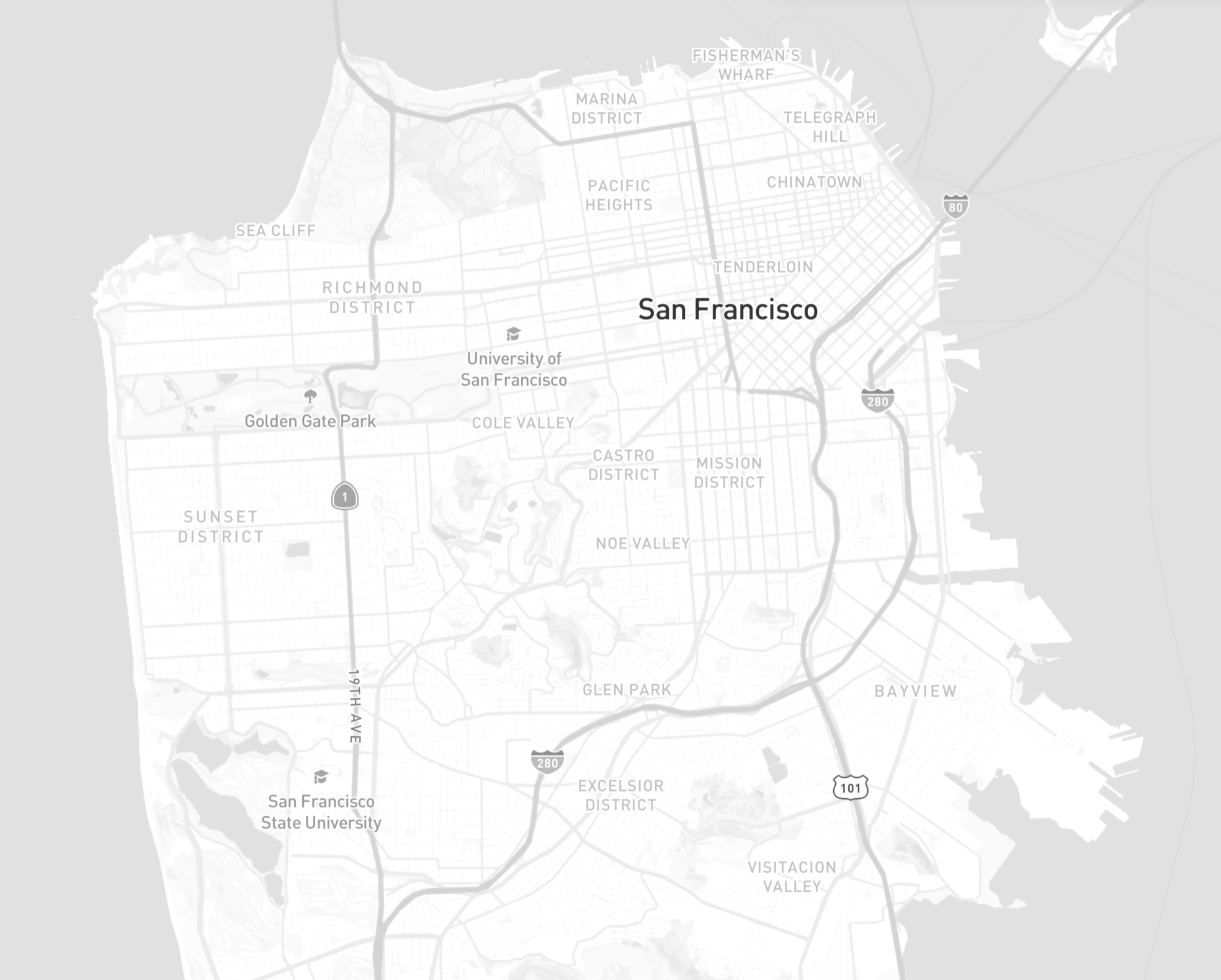
If you use the provided map, here’s a sample D3 snippet to set it up.
// Assumes you've included D3 version 7 somewhere above:
// e.g. <script src="https://d3js.org/d3.v7.min.js"></script>

const mapWidth = 1968 / 2.4
const mapHeight = 1580 / 2.4 // the 2.4 can be increased or decreased to adjust the size of the map while maintaining the aspect ratio

// These are the extent of our datapoints, coordinates-wise
const longitudeRange = [-122.52876879101329, -122.34501499128038]
const latitudeRange  = [37.69947941416328, 37.81633202723721]

mapFrameGeoJSON = {
  const coords = `[[${longitudeRange[0]}, ${latitudeRange[0]}],[${longitudeRange[1]}, ${latitudeRange[1]}]]`
return JSON.parse(`{"type":"Feature","geometry":{"type":"LineString","coordinates": ${coords}}}`)
}

// This projects a given [longitude, latitude] pair into [x, y] pixel positions onto our image.
// D3 geoMercator projection fitted to San Francisco map
projection = d3.geoMercator()
  .fitExtent([[0, 0], [mapWidth, mapHeight]], mapFrameGeoJSON)


var container = d3.create("div");
var svg = container
  .append("svg")
  .attr("width", mapWidth)
  .attr("height", mapHeight)
  .style("border", "1px solid black");

  // Add map image to our container
svg.append("image")
  .attr("width", mapWidth)
  .attr("height", mapHeight)
  .attr("xlink:href", "data/sf_map.png"); // Replace with the image url
The projection function returns a mapping from the coordinates
([longitude, latitude]) to the [x, y] pixel on your static map
backdrop that matches to the longitude/latitude pair. The projection
is an instance of a D3
projection. Feel free to read the
documentation to see more information on what you can do with the
projection function.
If you have a datapoint d with a given latitude and longitude, you
can add a circle to the map in the following way:
var projectedLocation = projection([business_longitude, business_latitude]);
var circle = svg.append('circle')
  .attr('cx', projectedLocation[0])
  .attr('cy', projectedLocation[1])
  .attr('r', 1);
To load your data, you can use the following code:
const data = d3.csv(
  "CSV_FILE_URL",
  (row) => {
    // Here you can add any pre-processing to each row, if needed
    return row;
  }
)
You are welcome to fork this starter Observable notebook: https://observablehq.com/d/acffc27512286e98.
FAQ
How to respond to DOM events e.g. clicks?
Similar to jQuery, D3 provides a simple interface to add even
listeners: use the on method on any
selection. For
example, to listen to click events on circles and print out the
associated data object:
d3.selectAll('circle')
  .on('click', function(d) { console.log(d); });
Why is my data undefined?
You are most likely trying to use your data before it is
ready/loaded. In JavaScript, HTTP requests are handled
asynchronously. When you call d3.csv, the browser starts makes an
HTTP request to that resource, and it immediately continues to execute
the following code:
// In D3 v7, the csv function uses Promises instead of asynchronous callbacks to load data
d3.csv("file.csv").then(function(data) {
	console.log(data);
});

// This code is going to run before data is loaded, and you cannot use the data here
console.log('We don't have the data yet.');
nonDataRelatedStuff();

// This will print:
// => We don't have the data yet.
// => We have the data now!
How should I be doing my D3 development?
If you submit an Observable notebook link, we will be testing your visualizations by running the cells directly within the notebook itself, using the most recent stable version of Google Chrome.
If you submit bundled code, we’ll be testing your visualizations in
the most recent stable version of Google Chrome (unless you come talk
to us with a really good reason to do something differently for you),
so use Chrome to develop. Chrome’s
DevTools
can be quite helpful as you work. Chrome also supports many ES6 and
beyond features (const
and let, arrow functions, async and await, etc.) so you’re
welcome to use these if you’re familiar with them, but there’s
definitely no need.
You might also need to run a local web server while you’re developing,
because Chrome may fail to load data through d3.csv (or other
XMLHttp Requests) for security reasons if you don’t. To do this, you
can run python -m http.server from the directory where your code
lives. (Your command line should give you a localhost link.) If that
doesn’t work for you, come talk to us.
You can use GitHub Pages to host your web-based visualization software at no cost. As a student, you can upgrade your GitHub account to the Pro version for free by signing up for the Student Developer Pack. The Pro version allows you to keep private repos.
Other resources for learning D3 (and other web programming)
-
Review the slides for week 4 of the class (These have some links to other resources in them too), and other links on the homepage of the website.
-
There are lots of D3 code samples on Observable, a website run by the creator of D3, Mike Bostock. You can definitely take a look at examples here (and on Stack Overflow, etc.) for learning techniques, but please be very transparent by citing any external code snippets that you adapt, or even ones that simply inspire how you do something. We expect your design choices and your implementation to be original.
-
When in doubt, refer to the D3 API documentation. It is dense in places, but very thorough.